Quire Commands
Learn how to start and preview projects, output files, and more
Quire commands are typically run from Terminal on a Mac and Git Bash (or its equivalent) on a PC. They control creating, previewing, and outputting Quire projects. The following commands are available.
- Run
quire --helpin your command-line shell for a full list of the Quire commands and options defined below.
Start and Preview Projects
quire new project-name- Create a new Quire project named
project-namein the current directory. The name can be anything, but shouldn’t contain spaces or special characters. quire preview- Run a local server to preview the project in a browser. Defaults to previewing at http://localhost:1313/, but will use other port numbers (such as http://localhost:6532/) if 1313 is busy. The specific address will be listed in your command-line terminal after running the command. If you’re having any issue with the preview, try running
quire preview --verboseinstead. This outputs error, warning, and other processing information that can sometimes be useful in troubleshooting. quire install- Install this project’s theme dependencies when you update or change themes.
quire stop- Stop the preview from running. This can also be done by typing Control-C.
Output Files
quire site- Build the final web files for your publication into its
sitedirectory. These include all the pages, images, and styles necessary for your project, and can be hosted on any web server. quire pdf- Generate a PDF version of your publication into its
static/downloads/directory asoutput.pdf. quire epub- Generate an EPUB version of your publication into its
static/downloads/directory asoutput.epub. quire mobi- Generate an MOBI (Kindle) version of your publication into its
static/downloads/directory asoutput.mobi.
For the PDF, EPUB, and MOBI commands you can specify a new filename with the --file option.
quire pdf --file=photography
Outputs as: static/downloads/photography.pdf
Or you can specify a name and an alternative file path. If the directories don’t already exist in your project, Quire will create them and output the file there. We recommend always outputting somewhere into the static directory as this will automatically be included in your project when you run quire site to output the final web files.
quire epub --file=static/ebooks/photography
Outputs as: static/ebooks/photography.epub.
Also for the PDF, EPUB, and MOBI commands, developers may use the --env option to specify and environmental variable.
Customize File Templates
quire template epub- Download the built-in template for customization of the cover and title pages of the EPUB and MOBI files Quire outputs.
epub/template.xhtmlAll other template customization (for the website and pdf/print versions) is done in thethemedirectory.
Get Help
quire -Vquire --version- Output the version number.
quire -hquire --help- Output usage information.
quire preview --verbose- Show verbose output in the command-line. Includes warnings, errors, and process information.
quire debug- Development use only. Log info about current project.
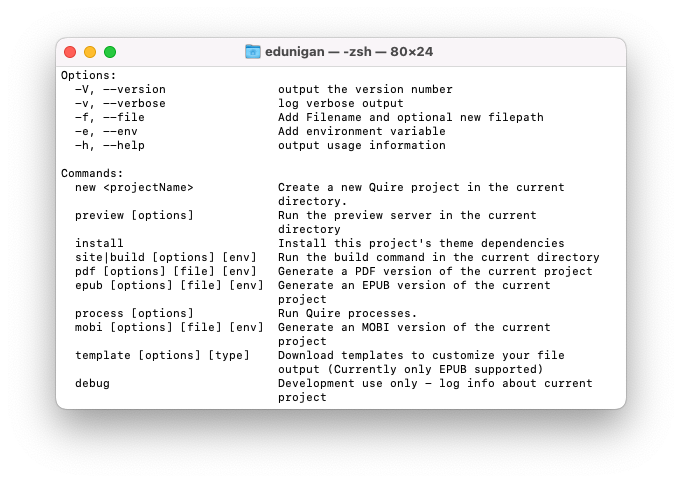
quire --help.